Introduction
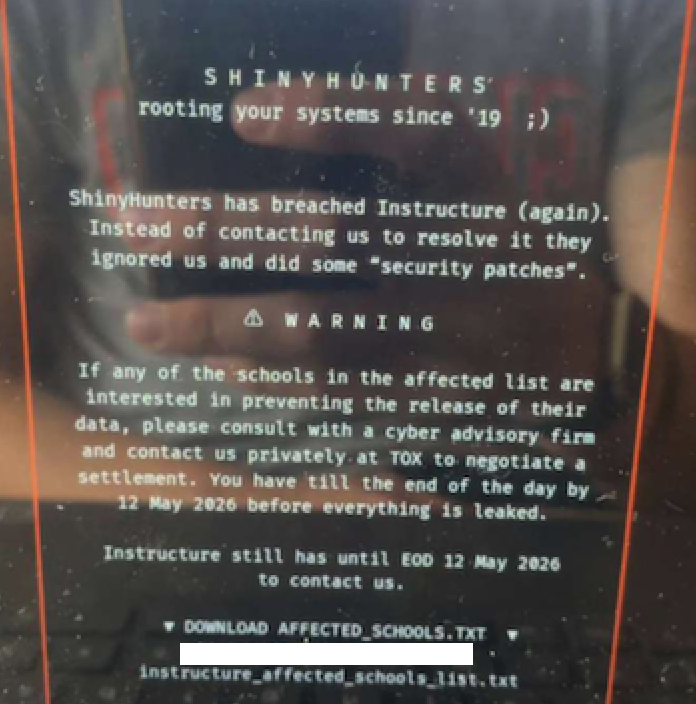
In May 2025, a massive data extortion attack struck Canvas, the widely-used learning management system (LMS) from Instructure, disrupting classes and coursework at thousands of U.S. schools and universities. The cybercrime group ShinyHunters defaced the login page with a ransom demand, threatening to leak data from 275 million users across nearly 9,000 institutions. This incident, which occurred during final exams week, paralyzed campuses and forced Instructure to temporarily shut down the platform. While the breach was eventually contained, it highlights the urgent need for educational institutions to have a clear, step-by-step plan for responding to LMS data breaches. This guide walks you through the essential actions to take before, during, and after such an event, using the Canvas case as a real-world example.

What You Need
- Incident Response Team: A pre-designated group including IT staff, legal counsel, communications officers, and senior administrators.
- Communication Channels: Secure email lists, phone trees, and a dedicated status page or social media account to update stakeholders.
- Legal and Compliance Guidance: Access to attorneys experienced in data privacy (FERPA, state breach notification laws).
- IT Security Tools: Log analysis software, network monitoring, and forensic capabilities to contain the breach.
- Backup and Recovery Plans: Offline backups of critical data and procedures to restore the LMS if needed.
- Relationship with LMS Vendor: Direct contact information for your LMS provider’s security team and account manager.
Step-by-Step Response Plan
Step 1: Confirm and Contain the Breach
As soon as you suspect unauthorized activity on your LMS—such as a defaced login page, ransom demands, or reports of data leaks—your incident response team should immediately confirm the breach. In the Canvas case, students and faculty first noticed the ShinyHunters extortion message on the login screen. Do not ignore early warnings. Immediately isolate affected systems: take the LMS offline if the vendor has not already done so, or suspend user access to prevent further data exfiltration. Contact your LMS vendor’s security team (for Canvas, that’s Instructure) and share your observations. Ask them to confirm the scope and whether they have already taken containment steps.
Step 2: Assess the Scope and Data Compromised
Work with your IT team and the LMS provider to determine what data was accessed or stolen. In the Canvas breach, ShinyHunters claimed to have names, email addresses, student IDs, and private messages. Instructure later confirmed that certain identifying information was compromised, but stated that passwords, dates of birth, government IDs, and financial data were not affected. Document everything—create a timeline of events, list the types of data exposed per user role (student, faculty, staff), and identify the number of affected individuals. Use forensic logs if available. This assessment will be critical for legal notifications and public statements.
Step 3: Communicate Internally and Externally
Clear, timely communication is essential. First, brief your internal stakeholders: senior leadership, faculty, and IT staff. Use secure channels (not the compromised LMS). Then, prepare external communications. In the Canvas incident, Instructure posted a status message saying “Canvas is currently undergoing scheduled maintenance” while they investigated. However, many schools also directly informed students and parents via email and social media. Your messages should include: what happened, what data may be involved, what steps you are taking, and how individuals can protect themselves (e.g., change passwords, monitor for phishing). Avoid speculation. Coordinate with your legal team to ensure compliance with breach notification laws (most states require notification within 30-60 days).
Step 4: Engage with the Platform Provider (Instructure)
Your LMS vendor is a key partner. For Canvas users, Instructure’s official statements on May 6 and May 7 revealed that they believed the incident was contained yet later had to take the platform offline again due to the ransom defacement. Establish a direct line of communication with your vendor’s incident response team. Ask them for: a detailed timeline of the attack, a list of affected data types, their remediation plan (e.g., patching vulnerabilities, resetting credentials), and estimated restoration time. Request regular updates and a post-incident report. If the vendor is unresponsive or slow, escalate to senior management or consider legal remedies.
Step 5: Protect Users and Prevent Further Damage
Even if the breach appears contained, take proactive steps to protect users. In the Canvas case, ShinyHunters had already stolen private messages and personal information. Immediate actions: Force password resets for all users after the LMS is restored (if the vendor supports it). Enable multi-factor authentication (MFA) if not already active. Send a security alert urging users to be wary of phishing emails that may use stolen data to appear legitimate. Monitor network traffic for suspicious outbound connections. Consider temporarily disabling message or file-sharing features if they were part of the breach vector. For sensitive data like grades or Social Security numbers, offer credit monitoring or identity theft protection services.
Step 6: Evaluate the Ransom Demand and Decide on Response
The ShinyHunters group demanded payment from both Instructure and individual schools, with deadlines that shifted from May 6 to May 12. In most cases, law enforcement (FBI, CISA) and cybersecurity experts strongly advise against paying ransoms, as it encourages further attacks and does not guarantee data will not be leaked. Instead, focus on mitigating the damage. You can negotiate with the attacker via professional incident response firms, but only if legal counsel approves. In the Canvas case, Instructure did not pay, and the platform was eventually restored. Your institution should have a pre-defined policy on ransom payments that aligns with federal guidance.
Step 7: Plan for Long-Term Recovery and Security Enhancements
After the immediate crisis is resolved, conduct a thorough post-incident review. In the Canvas breach, the disruption hit during final exams, underscoring the need for backup plans. Develop a recovery roadmap:
- Patch all vulnerabilities identified in the forensic investigation.
- Implement stronger access controls (e.g., role-based permissions, MFA).
- Train staff and students on recognizing phishing and social engineering.
- Establish offline backup procedures for critical course data.
- Consider alternative LMS options or redundancy if the vendor’s security posture is weak.
- Update your incident response plan based on lessons learned.
Tips for a Smoother Response
- Stay calm and methodical: Breaches cause panic, but a structured approach reduces errors. Follow your plan step by step.
- Document everything: Every action, communication, and decision should be logged for legal and audit purposes.
- Communicate with empathy: Students and faculty are already stressed—especially during exam periods. Acknowledge their concerns and provide clear next steps.
- Use this as a learning opportunity: No system is 100% secure. Treat each breach as a chance to strengthen defenses and improve response procedures.
- Establish vendor accountability: After the incident, review your contract with the LMS provider. Consider requiring security audits, breach notification timelines, and liability clauses.